Who can
The matrix answers "what can this group do?". The who-can page answers the other question: "who can do what to this object type?".
Open it by clicking an object type in the matrix, or at
/plugins/permissions-matrix/object-types/<app_label>.<model>/, for example
/plugins/permissions-matrix/object-types/ipam.prefix/.
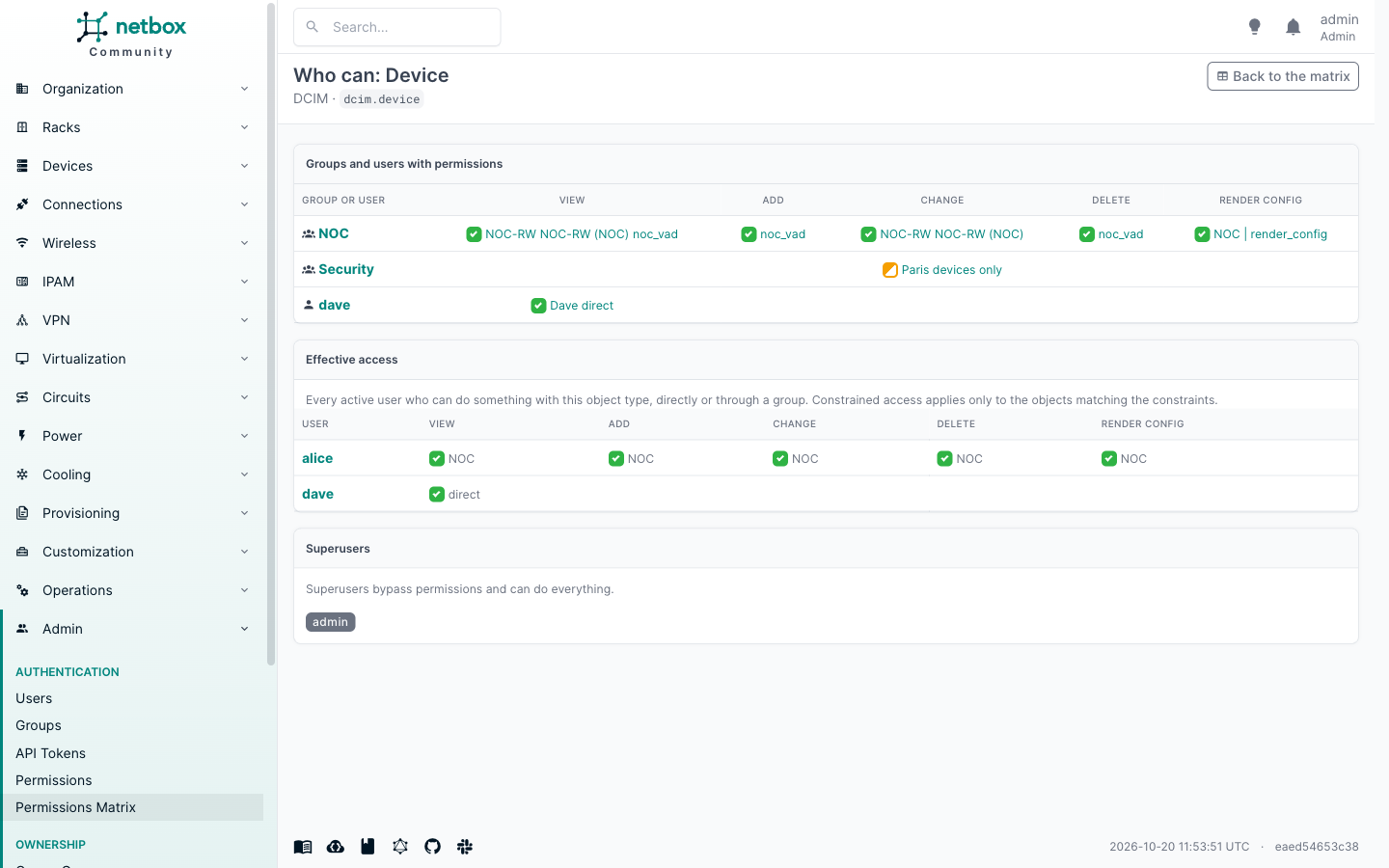
Principals
The first table has a row for every group and user that holds any action on the object type through a permission assigned to it, and a column per action. Cells use the same states as the matrix, and hovering one lists the permissions behind it.
Effective access
The second table resolves group membership: one row per user that any permission on the object type covers, with each action and where it comes from (a direct permission, or the groups that grant it). Constrained access is shown with its constraints, because whether it applies depends on the object. An action shown grey comes only from disabled permissions and gives no access.
Superusers are listed separately: they bypass permissions and can do everything.
Inactive users are left out, because NetBox refuses them whatever their permissions.
Groups and users you cannot view
Groups and users you are not allowed to view have no row in the first table, and the page says when it left some out. Access through a group you cannot view still counts in the second table: the user is listed, and the source reads "a group you cannot view". Users you cannot view are left out of the second table, and the page says so. The same goes for superusers you cannot view.