Group tab
Every group's page in NetBox (Admin > Authentication > Groups, then a group) gets a Permissions Matrix tab. It shows that one group's matrix turned around:
- object types down the side, grouped by app, as on the main page;
- one column per action: View, Add, Change, Delete, then custom and other actions;
- the same cell states, tooltips, search, app filter and Only rows with grants switch.
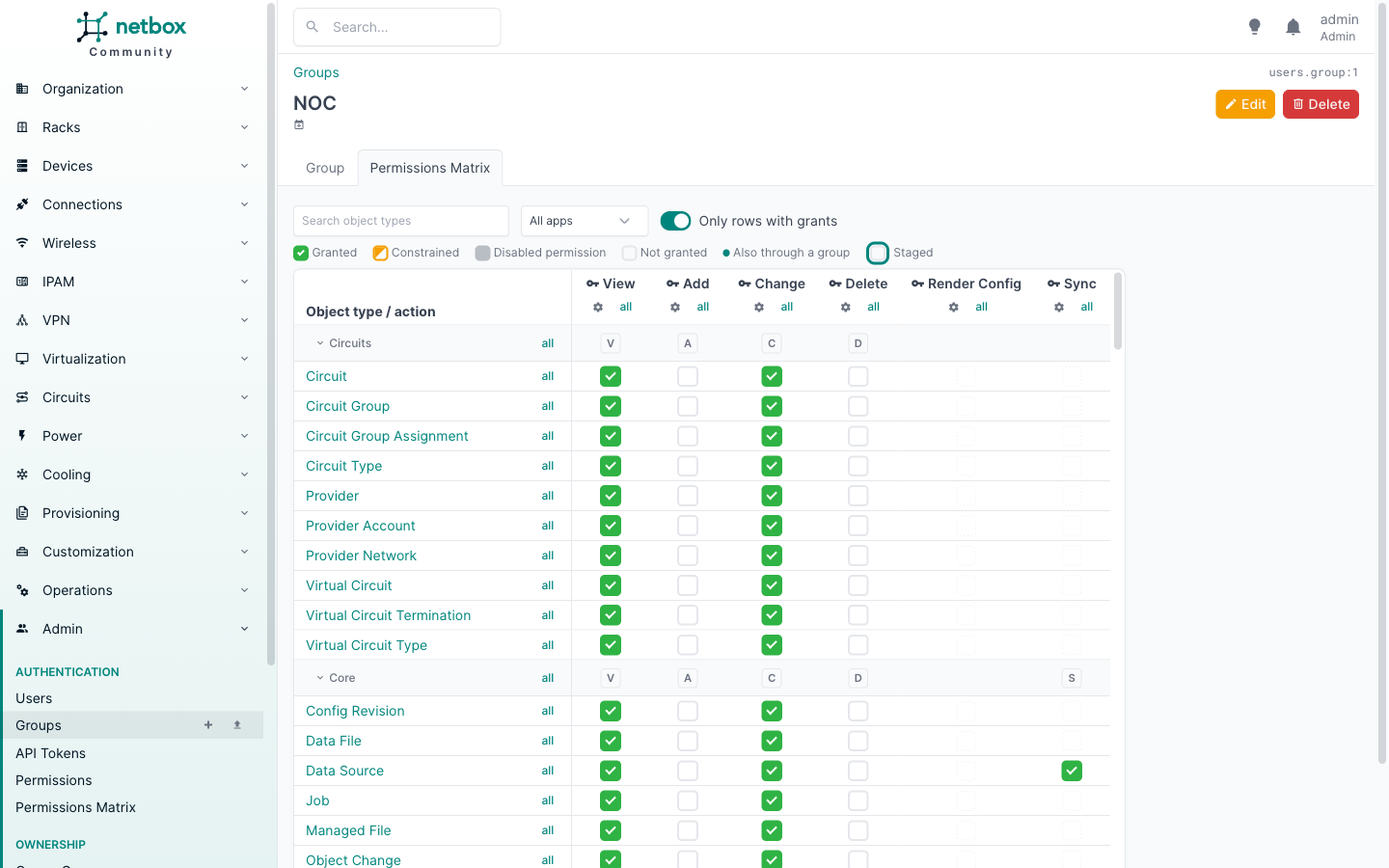
Use it to answer "what can this group do?" in one screen, or to review a group before adding someone to it.
Changing cells
With the right to change permissions, cells toggle and stage exactly as on the main page, and Review changes shows the same plan. Rows and actions have all toggles, and each app section has, under each action, its letter: it toggles that action on every row of the app (no letter when no row of the app has the action). Revert last takes back the last change. Custom actions are only enabled on the rows of models that register them.
The gear next to each action opens the gear panel with the group's permissions that grant that action, to edit their name, description, enabled flag and constraints.
Who sees the tab
The tab appears for users with users.view_objectpermission. Like the main page, it then needs that view to be
unconstrained: see Permissions.
Export and import are on the main page only. To export one group, pick only that group with Groups there, then click Export.